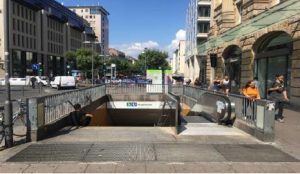
The new article on Generic Tasks is dedicated to a task from the ” Velocity ” category. With the help of the task wizard, this task can be created in the shortest possible time, as always, and the corresponding object can be found everywhere in your environment, especially in urban areas. You can read the first article on Generic Tasks, which also tells you how to get to the task wizard and what Generic Tasks are, here.

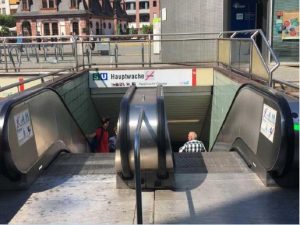
The object we are going to look at in this article is escalators. They are often found in public buildings or at the entrances to subway stations or train stations. The task that is available for escalators in the task wizard is:

“Determine the speed of the escalator. Give the result in meter per second. Give the result with two decimal places.”

Required for creating the task are the time duration, which the escalator needs to travel a well-defined distance. In addition, you can select whether the speed should be specified in m/s or in km/h. Based on the entered data, the wizard fills in the rest of the task form and only a picture needs to be added to complete the task.


In the next article we will deal with the probably most special category of Generic Tasks, the so-called GPS tasks. Until then, have fun and save time when creating MCM tasks with the Task Wizard!


Not even half a year has passed since we cracked the mark of 30,000 tasks in the MathCityMap system. Today, we are more than happy to announce the achievement of the next milestone. We are celebrating over 40,000 tasks in the web portal! Our users were also very active in the first half of 2022, and today we have exactly 41,356 tasks in the portal.

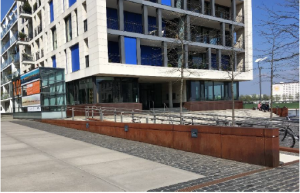
Our anniversary task, which cracked the 40,000 mark, was created by Tobi Walter-Born in Berlin and asks for the area of the front of a goal wall. Click here to go to the task.

We look forward to many more MathCityMap tasks and we are excited to see when we will reach the next mark of 50,000 tasks!

In the beautiful South Tyrolean city of Merano, teacher Michael Perkmann recently created the task “Height of the Powder Tower in Merano”, which we would like to present to you today as the task of the week. The goal of the task is to determine the height of the old powder tower.  Michael Perkmann reports about his task and the use of MathCityMap in the classroom in the following.


How did you come across the MathCityMap project? How do you use MCM?

I first heard about MathCityMap about 3 to 4 years ago at a teacher training course in South Tyrol. At that time we did the first Mathtrails in groups and tried to create our own tasks.

Since there are hardly any tasks and trails in South Tyrol and especially in Merano at the moment, I have always planned to create my own math parkour with my students one day.

I created this task for the Powder Tower together with my students from the Business School in Merano as part of an interdisciplinary project to get to know the MathCityMap platform better.
The goal is that the students themselves will soon create several tasks in the vicinity of Merano.

Together we will try to enter the tasks into the portal and then create a trail.


What can the learners gain by working on the tasks?

I think that working on tasks requires many competences of the students, especially modeling, creating text tasks, applying mathematical representations, creativity in solving mathematical problems.

This is often neglected in frontal teaching. MathCityMap is therefore a great addition to the lessons and the work outside the class motivates and makes fun for the students.

In this article on Generic Tasks, we would like to introduce you to two tasks from the “Number” category. As always, you can find the corresponding objects everywhere and the tasks can be created in no time using the task wizard. The first article on Generic Tasks, which also tells you how to get to the Task Wizard and what Generic Tasks are, can be found here.

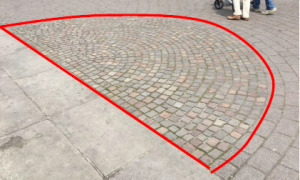
The first object category we want to talk about here are paved areas or walls. Especially in city centers or public places you can often find areas that are paved with stones. In the picture below you can see an example of a semicircular area, which was laid out with paving stones. The task, which is provided for this in the task wizard, reads:

“With how many paving stones was the area shown laid out?”.

The values needed to create the task with the wizard are only the size of the total area and the average number of stones on a square meter. Starting from this data, the wizard fills in the complete task form and only a picture needs to be added to complete the task. Similarly, there is a task in the wizard that asks for the number of bricks that make up a wall.


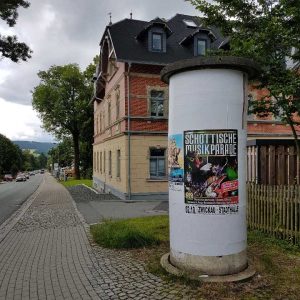
Another object for which a Generic Task can be created in the Wizard is the typical advertising pillar. After manually entering the circumference and height of the area that can be placarded, the task here is:

“How many DIN A0 posters can be placed on the advertisement pillar without overlapping? DIN A0: length = 84cm; height = 119cm.”.

An interesting aspect of this problem is that it can only be solved correctly if the condition of not overlapping, which is necessary in reality, is taken into account. If you divide the surface of the cylindrical column by the surface of a poster, you get a result which is mathematically reasonable, but which turns out to be wrong in the validation on the real situation.

In the next article about Generic Taks we will have a look at the tasks in the wizard, which are available for the topic “Volume and Weight”. Until then, we hope you have fun and save time when creating MCM tasks with the task wizard!


In the last article on Generic Tasks, which you can read here, we already showed you how you can use Generic Tasks to save time when creating tasks in your surroundings. In this context we showed you the Generic Tasks implemented in the system for the topic Combinatorics. Another theme that the task wizard can help with is slopes.

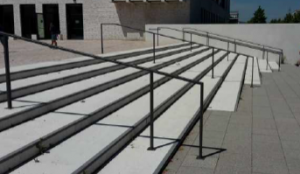
The objects for which Generic Tasks were created and which can also be found almost everywhere are ramps and handrails of staircases. Since, for example, ramps are not allowed to have a slope greater than six percent for use by wheelchairs, it makes sense to design an MCM task that asks exactly what the slope is.

To create the task, you only have to insert the data measured at the ramp into the task wizard and specify whether the result of the task is to be determined in percent or in degrees. The resulting task text is quite simple: “Determine the slope of the ramp in percent (degrees).


The creation of tasks with the wizard for handrails works in the same way. The sample solution and the hints are again created in a suitable way and only the task image has to be inserted.

In the next article on Generic Tasks we will deal with the creation of tasks on the topic “Number”. Until then, we wish you again a lot of fun and success in creating new tasks with MathCityMap!


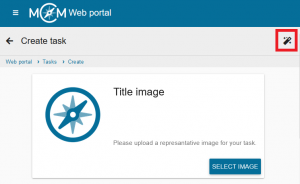
The so-called Generic Tasks offer a significant simplification when creating MathCityMap tasks. Generic tasks are tasks for objects that can be found, in a slightly modified form, in any place in the world. They are therefore tasks that can be implemented almost anywhere. Within the MoMaTrE project, several Generic Tasks, covering different topics, have been developed and implemented in the MCM web portal. You create a Generic Task by activating the so-called Task Wizard via the magic wand icon in the “Create task” section. Here you select the desired topic and object and enter only the data collected from your own object. The wizard then automatically creates a completely filled out task form with a ready-made sample solution, a suitable task text and appropriate hints. After inserting a task image, the task is thus ready for publication and can be used within a very short time.


In this and the following articles, we would like to introduce the various topics and objects for which Generic Tasks are currently available in the Task Wizard. First, we will take a look at the topic of combinatorics.

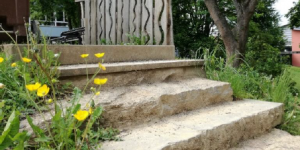
An object that can be found almost everywhere are stairs. Of course, a staircase can be used to design a wide variety of tasks. However, one combinatorial task that can be applied to any staircase is the following generic task:

“How many possibilities exist to go upstairs if one can take one or two steps within each move? The step sequences can be combined.”

There are several approaches to solving this task:
One approach is to write down the possibilities systematically.

Another approach to solving the problem is to use the Fibonacci series:

(1) 1 2 3 5 8 13 21 34 55 89 etc.

When creating the task, you only have to specify how many steps the staircase consists of on which you want to create this task. Everything else will be filled in automatically by the task wizard.
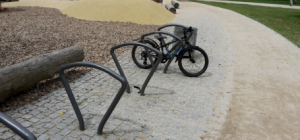


Another object for which a Generic Task from the combinatorics section was created and which can be found quickly is a bicycle stand. Here, the following task is generated by entering the number of existing bicycle racks and a quantity x of bicycles that you specify.

“x bikes should be locked at the stand. Each bike can be locked at the left or right. How many possibilities exist to lock the x bikes at the stand? It does not matter whether the bikes are locked “forwards” or “backwards”. You can assume that the stand is completely empty.”

Again, suitable sample solutions and hints are created by the wizard without any action on your part.

In the next article on Generic Tasks we will show you which possibilities for tasks regarding the topic “Slope” are already available in the task wizard of MathCityMap. Until then, we wish you a lot of fun and saved time when creating your own tasks!

 

The MathCityMap team has recently developed several new task formats! By now, MathCityMap offers nine task formats plus the possibility to create subtasks. All task formats are shortly presented in the following.

Furthermore, we make available an Example Trail including all task formats. This trail can be viewed in the web browser here respectively by the code 065522 in the MathCityMap app.


The interval is the ‘classic’ MathCityMap task format. It is to be used whenever measurements are necessary, e.g., to determine a length, an area or a volume.

Interval

The format Exact Value can be used for counting tasks or for combinatorial problems: How many windows do you spot on the house wall? How many possibilities do I have to lock my bike at this bicycle stand?

Exact Value

To raise more than one questions on a measuring activity, the task format Vector (Interval) can be used. Example: Determine the length, width and height of the pictured cuboid. Also, the task format can be applied for questions concerning spatial geometry.

Vector (Interval)

NEW TASK FORMAT!

Analogously, we offer the Vector (Exact Value) format which can be used to set several counting tasks or combinatorial problems at once.

Vector (Exact Value)

NEW TASK FORMAT!

If several numbers are the expected solution in a task, but the order in which the numbers are to be entered is not important, the Set task format can be used. In the app, only the numbers are entered into input fields. An example of a Set task can be found in the math trail above mentioned.

Set

NEW TASK FORMAT!

The Information Station is a task format without an input field in the app. It is implemented to offer important facts, e.g., to historical buildings, persons or realities during the math trail.

Information Station

NEW TASK FORMAT!

Another new task format is Fill In The Blanks: Within this format, gap texts can be easily worked on outside the classroom, e.g., to analyse objects outdoors in technical language, to deal with data from information boards or to raise questions on data of historical realities.
Note: Please use the “strict” mode if a number should be filled into the gap.

Fill In The Blanks

NEW TASK FORMAT!

Also, available data can be queried within the Multiple Choice format like in a quiz. Thereby, at least two answer options must be given, of which at least one is correct.

Multiple Choice

The GPS Task format allows users to create tasks in which the students have to find a pre-defined position (e.g., the middle of the given points) or position themselves in a pre-defined figure (e.g., building a equilateral triangle)
Note: This type of task works best in more rural areas since the GPS signal is often too weak in cities.

GPS Task

Lastly, we offer the possibility to pre-structure more complex tasks by dividing them up into optionally or mandatory Subtasks. One example for using Subtasks is given in the upper mentioned trail.

Subtask

NEW TASK FORMAT!

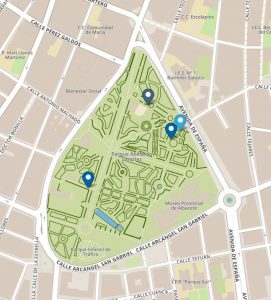
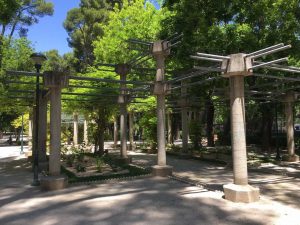
This week, Carmen Monzo, teacher in Spain gives us an inside into her task “Colums in the Parc”. It is created in a parc in Albacete, which ” is full of mathematical elements,  though people are not aware of them until they are in math-vision mode.”


Task: Columns in the Parc (Task Number: 3981)

Calculate the lateral surface (in m²) of one of the columns of this structure.


“I especially love this structure.  Parallel and perpendicular lines can be easily identified, as well as a set of columns (cylinders) whose lateral surface can be easily calculated by using a folding ruler or a measuring tape, and a calculator to introduce the data and the formula. The height of the cylinder is easy to get, but to calculate the radius of the base as accurate as posible, students first have to measure the circumference and then divide by 2*pi.

As this structure has a dozen columns, the activity can be done by around 20 students, comparing their results and thinking about the importance of the accuracy when measuring. To solve this task, students should have previously studied 2D and 3D shapes, the concept of the lateral surface and some formula to calculate it.

As a secondary mathematics teacher, I think that our students need to handle things, measure, count, touch, feel, use their senses… MathCityMap provides the motivation students and teachers need to do those things with the help of the mobilephone technology.”

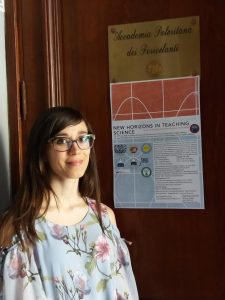
On 18 June 2018, the “New Horizons in Teaching Science” workshop was held in Messina, Sicily.

On this occasion, Eugenia Taranto spoke about the MathCityMap project and the collaboration with the Math MOOC UniTo (Massive Open Online Course University Turin) project.

Many different tasks, which were prepared by Sicilian teachers within the MOOC “Relations and Functions”, were shown.

A lot of interest was shown and we hope that the number of Sicilian and Italian tasks will continue to increase!

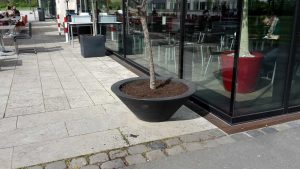
In case you search in our MathCityMap portal, you might notice that flowerpots enable various geometric tasks. Solely through the high frequency and the different shapes (cylinder, prismn with hexagonal area, etc.), the question how many liters of soil fit into the flowerpot, can be realised. In today’s Task of the Week, the flowerpot has the shape of a truncated cone.


Task: Flowerpot (Task number: 1219)

How many liters soil fit into the flowerpot, when it is filled until the top?


The formula for the volume of a truncated cone might not be known by all students. Therefore, they need strategies in order to solve the task, e.g. by means of the difference of a big and a small come. Further challenges are the determination of the small radius with help of the circumference and the consideration of the edge/bottom, which is obviously not filled with soil.