Today’s update extends the web portal with an important new feature. The mobile version of the portal (e.g. on mobile devices) now automatically starts in the so-called “draft mode”. It is a reduced and light weight view that displays the map and a plus button at the bottom right hand corner. Clicking this button allows to quickly create a task draft. Just add a picture via your smartphone and click on the “Get position” button to automatically set your position. The task draft will be accessible in the “My tasks” area. This features allows users to quickly create a task draft while they are outside that can be polished and finished later on at home. There is still the possibility to use all web portal functionalities on your mobile as well – just switch to “Default mode”. For more information take a look at the attached tutorial video.


Further changes:

  • Added caching of tasks: Freshly created task will be cached. If a user closes the new task form by mistake, the task creation can be continued by clicking on “New task” > “Draft”. This behaviour should prevent data loss.
  • Added possibility to remove task images: Title images and sample solution images may now be marked for deletion by clicking on the “Trash”-icon of the according image while editing a task. When the user saves the made changes, the marked images will be deleted (see image 4).
  • Moved mathematical symbols to the quick-jump bar: One can now toggle the mathematical symbols table via the “Omega”-sign inside the quick-jump bar next to the details window. (see image 3)
  • Preparation for the ‘digital classroom’ and sub tasks: Made many backend changes and adjustment to prepare the web portal for the introduction of the ‘digital classroom’ and sub tasks that will be activated this year.
  • Other changes:
    • Items that were shared by a group will be highlighted with the group name they come from inside the list view.
    • Removed gamification option ‘Leaderboard’ from trails menu. This option will be available again in the ‘digital classroom’ feature.
    • Fixed problems with decimal numbers in the task wizard in Internet Explorer and Firefox.
    • Small bugfixes and style changes.


With this great summer weather, it is no wonder that the math trailers move outside. We are very pleased that this week the 4000 task border was reached in the portal.

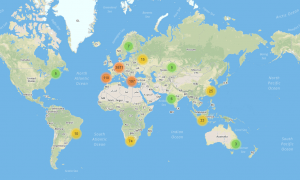
Outdoor mathematics with MathCityMap around the globe is achieved with help of currently about 1500 users. Together, over 600 routes were created in 17 different countries. Significant actors are next to our international cooperation partners of MoMaTrE and the MOOC of the University of Turin of course the many motivated task creators who use MathCityMap at their school, university or in their free time. Thanks a lot!

As a result, we can observe a great development of the project and are already making future plans!

After improving the task and trail details in our last portal update, this update focuses on the toolbar. The main aim of these updates is to get MathCityMap on a well established technical level and to make sure that a higher amount of data do not affect the functionality.

Overview of all Changes:

  • Data in the lists are loaded asychronously
  • Revision of the working groups
  • Possibility to cancel content from the review process
  • Revision of the searching function
  • Minor bug fixing

Working Groups

  • In the list “My Tasks” and “My Routes”, you can see the items which are shared within a group, mixed with your own contents. The group items are marked with a coloured circle and the initials of the author.
  • Shared content cannot be shared, published or deleted by other group members.
  • If you share a trail with a group, automatically all tasks from the trail are shared as well.
  • The working group list shows further information, e.g. number of members and number of shared contents.
  • In the details of the working group, you can change the colour of the group (randomly chosen out of 10 fixed colours) and the shared tasks and trails are listed.

Review Process

  • After asking for publication of a content, you can cancel the review process by clicking the button “Cancel Publication”. This can be helpful in case you asked for publication by mistake.

Search Function

  • The search function opens a new tab with three entries:
    Routes – Here are trails listed that can be found via search
    Tasks – Here are tasks listed that can be found via search
    New Search – Opens a search box (send via ENTER or click on the magnifier)
  • With the button Search Settings, one further has the opportunity to configurate the search, e.g. the time slot of the task creation or an interval for the grades. Apart from this, one can choose in which fields contents should be searched.

Minor Bug Fixing

  • Through various actions, the portal can come into different states. Earlier, it was not systematic enough so that some actions led to error states. The states are now managed standardized and systematically. This should help to avoid and easily regulate errors.
  • Opening tasks and trails integrates so called GET parameters into the address bar, e.g. to send a specific trail via link (Attention: The content must be visible for the receiver). With the new update, it is further noted in which sub tab the portal is during the starting process.
  • The loading bar was changed into a loading circle with a message on the current process. Further, it is integrated more consitently. This should show the user what happens in the background.
  • Task, Box: Sample Solution: The bug that deleted the picture of the sample solution while changing the text of the sample solution was fixed.
  • Picture Upload: The bug that hindered the process of uploading a picture with the same filename was fixed.